
.png)
Description
Download Shakespeare AI Toolbar – AI writing assistant, browser extension, free trial
Overview
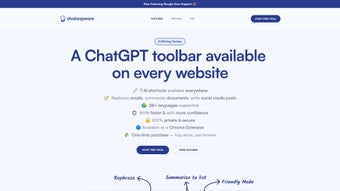
Shakespeare AI Toolbar is a cutting‑edge AI writing assistant that lives right in your web browser’s toolbar. Designed for professionals, students, and anyone who writes on a daily basis, the toolbar lets you summarize, explain, and rephrase text without leaving the page you’re working on. Whether you are drafting an email, polishing a research paper in Google Docs, or crafting a snappy social‑media post, the tool provides instant, on‑the‑fly suggestions that keep your workflow smooth and uninterrupted. One of the most compelling aspects of Shakespeare AI Toolbar is its commitment to privacy: all processing happens locally on the user’s device, so sensitive data never leaves your computer. The extension also includes grammar and spelling correction, multilingual support, and contextual prompts that help you break through writer’s block. Sold as a one‑time purchase with lifetime access, the toolbar eliminates recurring subscription fees while delivering the same level of intelligence found in premium AI platforms. In short, it’s a secure, feature‑rich, and cost‑effective solution for anyone looking to elevate their writing without juggling multiple apps.
Core Features that Transform Your Writing
- One‑click Summarization: Highlight any paragraph and receive a concise summary in seconds, perfect for quickly understanding long documents.
- Instant Rephrasing: Rewrite sentences with alternative phrasing while preserving tone and meaning, ideal for avoiding plagiarism or refreshing stale copy.
- Contextual Explanation: Get clear, plain‑language explanations of complex terminology or concepts directly in the toolbar.
- Grammar & Spell Check: Built‑in AI‑driven proofreading that catches errors, suggests style improvements, and adapts to your preferred language.
- Multilingual Support: Works with over 20 languages, allowing you to translate, summarize, or rewrite text in the language of your choice.
- Google Docs Integration: Seamlessly activates within Google Docs, letting you enhance documents without switching tabs.
- Writing Prompts & Idea Generator: When you’re stuck, the toolbar offers prompt suggestions to spark creativity.
- Device‑Side Processing: All AI calculations are performed locally, ensuring your data stays private and secure.
- Customizable Hotkeys: Assign shortcuts for your most used actions to speed up repetitive tasks.
- Lifetime License: One‑time payment grants perpetual updates, eliminating hidden subscription costs.
Why These Features Matter
The combination of summarization, rephrasing, and explanation tools means you can condense research, rewrite client emails, and clarify technical jargon without opening a separate AI web app. Grammar checking is no longer an after‑thought; it is woven into the same interface, reducing the need for additional extensions. Multilingual capabilities open doors for global teams, and the local processing model addresses the growing concern over data privacy in AI solutions. Together, these features create a cohesive environment where writing becomes faster, more accurate, and more secure.
Installation & Usage Instructions
Step‑by‑Step Installation
- Visit the official Shakespeare AI Toolbar page or the Chrome Web Store / Firefox Add‑Ons marketplace.
- Click Add to Chrome (or Add to Firefox) and confirm the permission request.
- Once installed, the toolbar icon appears next to your address bar. Click it to open the quick‑launch panel.
- Enter your email address to receive a license key. After purchase, you’ll get a one‑time activation code.
- Paste the activation code into the toolbar’s settings window and click Activate. The extension is now ready for use.
Everyday Workflow
After activation, the toolbar works automatically on any web‑based text editor. To summarize a paragraph, simply highlight the text and press the Summarize button that appears in the floating toolbar. For rephrasing, select the sentence and click Rephrase. If you need a definition, highlight the term and press Explain. The AI will generate results within a few seconds, displayed in a compact pop‑up that you can copy or insert directly into your document. The toolbar also features a persistent side panel where you can toggle grammar checking, switch languages, or access the prompt generator. Custom hotkeys can be set in the Preferences menu, allowing power users to trigger actions without ever leaving the keyboard.
Troubleshooting Common Issues
Extension not showing: Ensure your browser is up to date (Chrome 92+ or Firefox 89+). Disable any conflicting extensions that also manipulate the DOM.
AI responses are slow: Because processing occurs locally, older hardware may experience lag. Closing unused tabs and clearing browser cache often restores speed.
License activation fails: Verify you entered the exact code without extra spaces. If the problem persists, contact support with your purchase receipt.
These steps usually resolve most hiccups, keeping your writing flow uninterrupted.
Compatibility, Pros & Cons
Shakespeare AI Toolbar is compatible with the latest versions of Chrome, Edge, and Firefox on Windows 10/11, macOS 12+, and Linux distributions that support these browsers. Mobile browsers are not currently supported, but a companion iOS/Android app is planned for future releases.
Pros
- All‑in‑one solution for summarizing, rephrasing, and explaining text.
- Local processing guarantees privacy for confidential documents.
- One‑time purchase eliminates recurring subscription fees.
- Deep integration with Google Docs and other web editors.
- Multilingual support expands usability for international teams.
- Customizable hotkeys and UI settings for a personalized workflow.
Cons
- No native mobile browser extension yet.
- Initial activation requires an internet connection to verify the license.
- Older computers may experience slower AI response times.
- Limited to browsers; does not integrate directly with desktop word processors like Microsoft Word.
FAQ – Frequently Asked Questions
Is Shakespeare AI Toolbar completely free?
The toolbar offers a free trial with limited daily usage. Full access requires a one‑time purchase that grants lifetime updates.
Can I use the toolbar offline?
Yes. After the initial activation, all AI processing runs locally, so you can continue to summarize and rephrase text without an internet connection.
Which browsers are supported?
Chrome, Microsoft Edge, and Mozilla Firefox on Windows, macOS, and Linux. The extension is not yet available for Safari.
How does the privacy model work?
All AI calculations are performed on your device. No text is sent to external servers, ensuring that confidential information stays private.
Will I receive updates after purchase?
Yes. Lifetime license includes all future feature updates and bug fixes at no additional cost.
Conclusion – Boost Your Writing Efficiency Today
Shakespeare AI Toolbar packs a powerful suite of AI‑driven writing tools into a lightweight browser extension, making it an indispensable ally for anyone who writes online. Its focus on privacy, multilingual capability, and seamless integration with Google Docs sets it apart from generic AI assistants that require constant internet connectivity. By offering a one‑time purchase model, the toolbar provides long‑term value without hidden fees, appealing to both freelancers and corporate teams. If you’re looking to streamline your workflow, reduce the time spent switching between apps, and produce polished, error‑free content, this toolbar is a compelling choice. Download Shakespeare AI Toolbar now and experience a faster, smarter, and more secure way to write.
Overall Rating: 4.5 / 5
Guides & Tutorials for Shakespeare AI Toolbar
How to install Shakespeare AI Toolbar
- Click the Preview / Download button above.
- Once redirected, accept the terms and click Install.
- Wait for the Shakespeare AI Toolbar download to finish on your device.
How to use Shakespeare AI Toolbar
This software is primarily used for its core features described above. Open the app after installation to explore its capabilities.
User Reviews for Shakespeare AI Toolbar 0
No reviews found




